Everything you need to handle compliance,
nothing you don't.
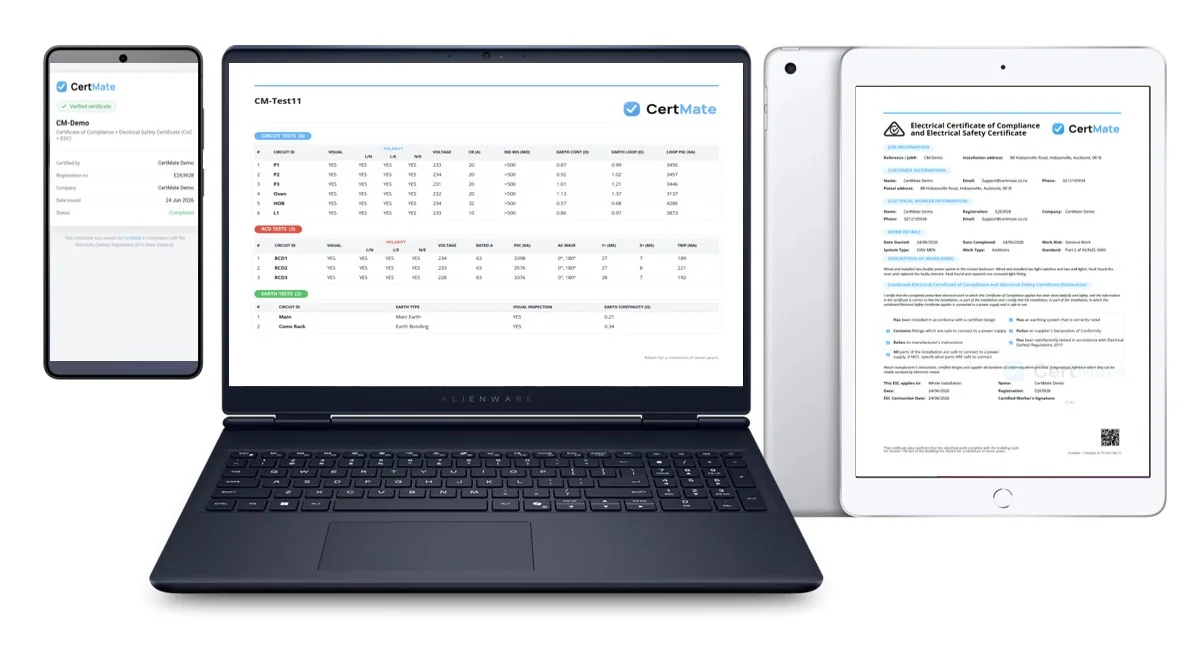
CertMate handles every certificate type NZ electricians need: COCs, ESCs, COCs + ESCs, COVs, ROIs, Emergency Lighting PS3 and full test sheets, all in one account.
The parts of the job that take the longest. Done for you.
Writing descriptions, transferring test results, checking a regulation and digging through team numbers are the most repetitive tasks around compliance paperwork. CertMate AI handles all four so you can get back on the tools.
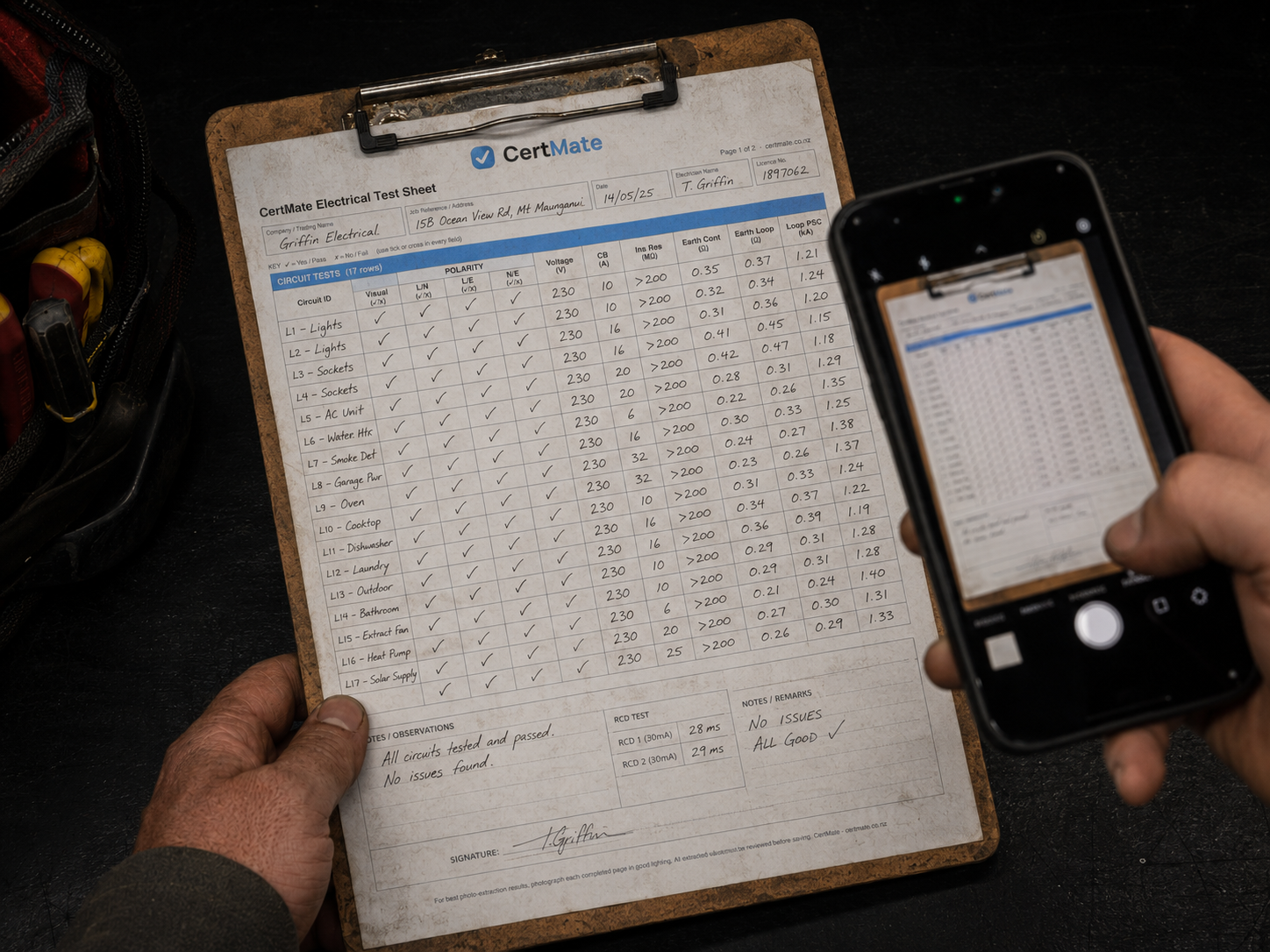
Photo to test sheet
Snap a photo of your handwritten test results and the AI transfers them into your digital test sheet, for both standard electrical test sheets and Emergency Lighting. No re-keying.

Voice to description
Speak your job description and the AI writes it up cleanly. No more stopping to type it all out while you are on site.

NZ Regs Helper
Ask a regulation question in plain English, right from the app, and get pointed to the relevant AS/NZS 3000 clause to check. No flipping blindly through the standard on site. Link your own free copy of the standard too, and open it instantly with Wiring Rules Quick Access.

Company Insight Reports
AI reads your team's output and writes up a plain-English summary: who's completing what, where the trends are, and what's falling behind.
"CertMate's AI speeds up the boring parts. It never makes the safety call."
Transparent about what AI can and cannot do
We believe you should know exactly how AI works in this product: what data it touches, what it can get wrong, and where your responsibility as an electrician begins and ends.
Wiring Rules Quick Access

Every registered electrician is required to work to AS/NZS 3000, but having it on hand on the job is another matter. Most electricians don't carry a copy, and default to phoning a colleague for an answer instead of checking the standard themselves.
CertMate lets you link your own locally saved free personal copy, downloaded from your EW Portal, and open it instantly from anywhere in the app, on any job. Once linked, it stays linked, no re-downloading, no digging through your files every time.
What this is, and isn't
AS/NZS 3000 remains the copyright of Standards New Zealand and Standards Australia. CertMate doesn't sell, host, or provide the standard, and never receives or stores a copy of it, the file stays on your own device at all times. This feature doesn't replace your EWRB registration or grant any new rights to the standard either, it's a convenience layer on top of the free access you already hold as a licensed electrical worker. See our FAQ for more detail.
Free, and yours
Your own personal copy, downloaded free from Standards New Zealand. CertMate never charges for it, and never holds a copy of it either.
One tap to open
Link it once, then open it instantly from the sidebar, your profile, or straight from a Regs Helper answer. No app switching, no searching through downloads.
Every electrician, covered
Every registered electrician on your team gets the same easy access, so the answer is a tap away on site, not a phone call to a mate.
Requires an active CertMate subscription, the AI add-on (included free during your trial), and a current, verified electrical or inspector registration.
Add it to your home screen. Keep working with no signal.
Install CertMate straight from your phone's browser, no app store, no download. It opens full screen like any other app, with an icon on your home screen for one-tap access on site.
Lost signal in a switchboard room or on a rural job with no reception? Keep filling in the certificate anyway. Your work saves on the device and pushes through automatically once you're back in range. On Android that happens the moment you reconnect. On iPhone it syncs the next time you open CertMate again while connected, since Apple doesn't allow apps to sync quietly in the background the way Android does.
One thing to know: AI features (voice to description, photo scanning, the NZ Regs helper) need a live connection to run, so they won't work while you're offline. Everything else, filling in and saving certificates and test sheets, works the same as always.

 CertMate
CM-2793
Certificate of Compliance + Electrical Safety Certificate (COC + ESC)

This is a real, live certificate. Scan the code above with your phone, or view the verification page directly.
Scan to verify authenticity
Every CertMate certificate carries a QR code. Councils, clients and electricity retailers can scan it to instantly confirm the certificate is genuine and has not been forged or altered. Your customers get peace of mind. You get proof that your work stands up.
Full test records on file
Record circuit, RCD, earthing and mains test results digitally, then attach them to the certificate or keep them stored on their own. If your work is ever questioned later, the evidence is right there.
CertMate keeps your test sheets alongside your certificates in the same account, so nothing gets lost.


Make it yours
Upload your logo and choose any brand colour from a full colour picker. Every certificate and test sheet that leaves your account is colour-matched to your company, looking custom and professional rather than pulled from a generic template.
Your clients receive a PDF that looks like it came from your business, not from a software company. First impressions matter, and a well-presented certificate tells your client the work was done properly before they even read a word.
Emergency Lighting PS3 certificates, built in
CertMate includes full support for Emergency Lighting PS3 certificates alongside your standard electrical certificates. Complete your Emergency Lighting test records in the same account, attach them to the certificate, and send a single, professional PDF to your client.
The CertMate AI photo scan feature also works with Emergency Lighting PS3 test records. Photograph your handwritten Emergency Lighting test sheet and the AI fills in the digital form for you to review, the same way it does for standard electrical test sheets.


Your team, organised. Your output, visible.
Add staff, assign roles and keep your compliance output visible at a company level. CertMate's Company Insights dashboard rolls up everything your team produces, certificates, test sheets, HVAC work and emergency lighting records, into one screen, alongside the account activity behind it.
- See certificates, test sheets and HVAC work completed by each staff member, this month, this year and all time
- Track certificate types and completion rate across your whole company
- Keep an eye on registration expiry dates for every technician, flagged before they lapse
- See your top customers by certificate volume and how often they come back
- Follow a live feed of recent account activity, logins, certificates created and inspector links
- Owner and admin roles get full visibility; technicians see only their own work
Heat pump installs and servicing
Log an Installation Test Sheet when you commission a new heat pump or air conditioning unit, covering visual inspection, nitrogen pressure test, vacuum/micron reading and refrigerant added, with support for multiple units on the same job.
Each time you carry out yearly maintenance, log a Service Checklist against the unit. CertMate automatically emails your office when a unit's next service falls due or goes overdue, so a follow-up job never gets forgotten.
Electrical companies get this built into their account alongside their certificates. Running an HVAC-only business? CertMate has a dedicated HVAC plan too.


Find the right clause in seconds
Stop flipping blindly through AS/NZS 3000 on site. Ask the NZ Regs Helper a question in plain English, from anywhere in the app, and it points you to the relevant clause or section to check, so you know exactly where to look instead of searching the whole standard.
It's a pointer to speed up your research, not a substitute for your judgement as the licensed person on the job, the same principle behind every CertMate AI tool.
Electricians and inspectors, connected in one click
CertMate maintains a directory of registered electrical inspectors who are also CertMate users. When your work needs a Record of Inspection and your inspector is on the platform, find them in the directory and link them to your certificate directly from within the app, with no chasing phone numbers or separate paperwork.
Once both parties are linked through CertMate, the electrician's certificate is automatically stitched to the inspector's ROI when they generate it. The inspector can see all certificates awaiting their attention on their dashboard, and once the ROI is completed both documents are tied together and filed. A process that used to involve emails and manual matching now happens in a single step, for jobs where both sides are on CertMate.
Inspectors get their own dedicated Inspector Portal: a purpose-built view showing all jobs assigned to them, with direct access to the relevant certificates and records. No shared logins, no workarounds.


Secure storage and searchable records
Every certificate is stored against your account the moment it is created. Find and resend any record in seconds when a client, buyer or insurer asks for it. No folders, no file names to remember.
Search across every field that matters:
- Job or certificate reference number
- Customer name
- Site address
- Certificate type
- Status (draft or completed)
Simple monthly pricing, no lock-in
Pay month to month with no contract and no setup fee. Add or remove seats as your team changes and your next invoice adjusts automatically, cancel anytime.
See pricing
Signatures and PDFs
Capture a signature on the screen and send a clean, branded PDF straight to your client by email.
Answers when you need them, without leaving the app
CertMate includes a built-in help chat available from every page. Ask it anything about how the software works and it responds instantly, drawing from the full CertMate knowledge base.
No separate help portal to navigate. No waiting for an email reply when you are in the middle of a job. The chat button sits in the corner and is ready whenever you need it.

More on the way
CertMate is built by electricians who use it every day, so when something could work better, we know about it firsthand. New features are shaped by feedback from our users and by what we see missing in our own workflows, built together with the people who use it.
If there is something specific your business needs, we want to hear about it. We work with our customers to figure out what gets built next, including which job management platforms we connect to after Fergus and Simpro.
Tell us what you needReady to ditch the certificate pad?
Start your free trial today. No credit card, no contract.
Start free trial5 founding spots remaining. Lock in 20% off the standard rate for life. Learn more